
The finding to use
Match the exact service and its documented scope to the work you need to keep.
Sources checked 24 November 2026. Follow the reasoning, then use the worksheet for your own situation.
01 / Tech Ka Asli Sach
Write the job that the headline must satisfy
Imagine a creator choosing an unlimited backup service for footage kept on a network drive. The capacity sounds suitable, but the buying decision still depends on whether that location is covered. This is a fictional scenario, not a failed backup we observed.
Start with the files and the task.
Are you protecting files that remain on a computer, sharing current work with a team, or keeping an archive after removing the local originals? Write down which outcome you need. The same amount of stored data can belong to very different workflows.
This guide gives you a way to read the product documentation against those needs. It does not compare tested performance, interpret legal rights or establish that a particular service is the best choice.
02 / Tech Ka Asli Sach
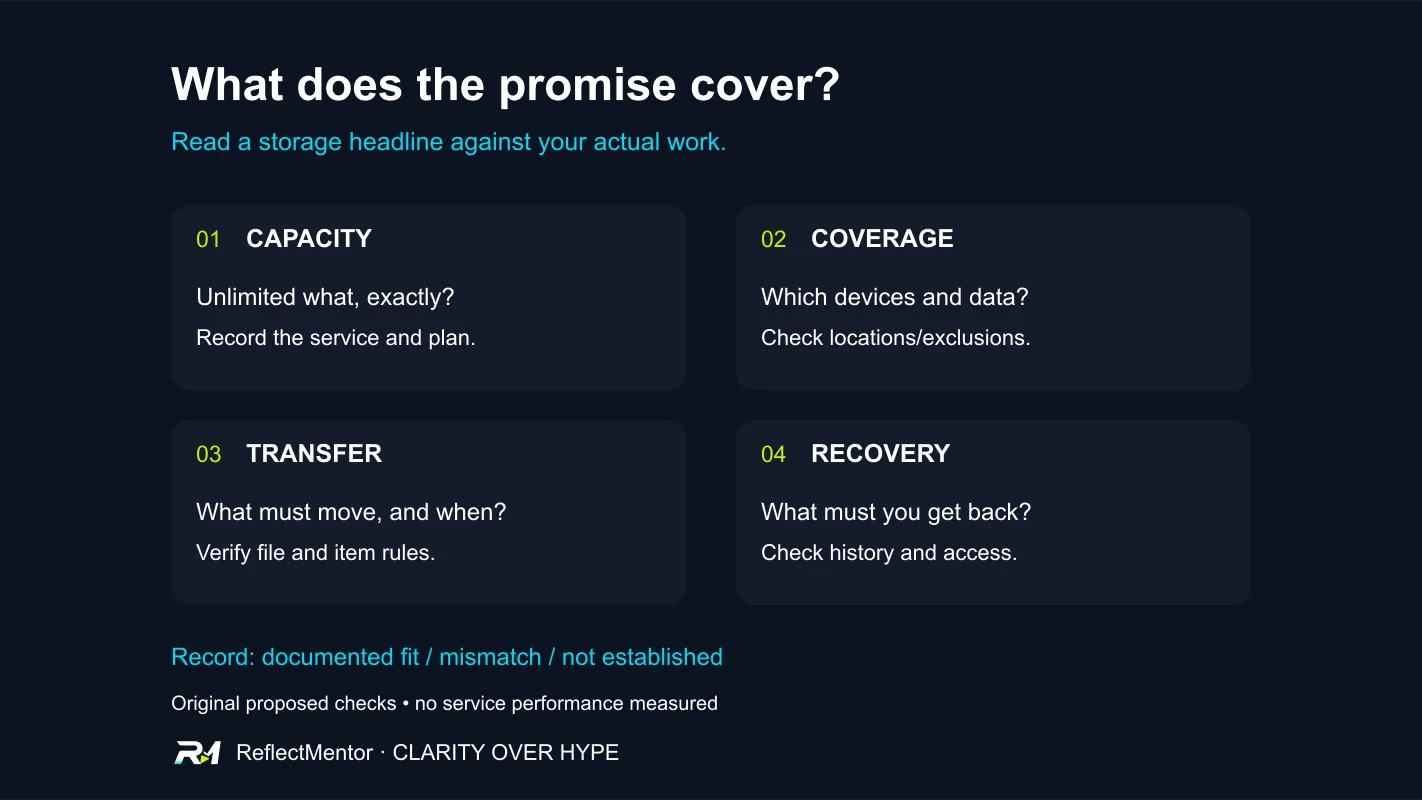
Identify exactly what unlimited describes
Record the service name and the specific plan or account setting. Then find the subject of the capacity promise: backed-up data, active storage, supported computers or something else. Keep that wording beside the source URL and the date you checked it.
Backblaze Computer Backup provides a concrete example. Its overview describes unlimited backup data on the computer and physically connected internal or external drives. It also explains that the product is not intended as cold storage for data you no longer keep on the computer. [1]
The useful question is whether that design matches your job. A person protecting active local work and a person trying to free all local disk space should investigate different requirements. The capacity statement alone does not settle both.
Keep backup, collaboration and archive requirements in separate worksheet rows. This is a proposed comparison method, not a claim that every service uses those words identically.
03 / Tech Ka Asli Sach
Check eligible locations and excluded data
Inventory the places your important work lives: laptop folders, attached drives, network storage and any other relevant location. Do not reduce that list to one total number of terabytes. A file outside the covered locations is a different problem from insufficient capacity.
Backblaze Computer Backup’s supported-data documentation currently excludes network-mounted drives, NAS devices, remotely mounted computers or volumes, and shared volumes. [2] That is a scope rule for the named product, not a statement about every service sold by the company.
The same documentation has an exclusions section covering items such as operating-system and application files, with configurable file-type exclusions. [2] Check the actual settings and relevant documentation for your files instead of assuming that automatic selection establishes complete coverage. For the fictional creator, the next action is to verify support for the network-held footage before choosing a plan. No subscription, workaround or migration is recommended here. The unresolved fit question should remain visible.
04 / Tech Ka Asli Sach
Separate stored capacity from transfer and item limits
A storage allowance does not describe every operation you might need to perform. Record limits on individual files, uploads, copies, item counts and the path you will use. Keep your required task beside each documented constraint.
Google Workspace shared-drive guidance illustrates this distinction: it lists a 500,000-item cap that includes files, folders, shortcuts and items in trash, and says the cap is based on item count rather than storage use. [3] It separately documents upload and copy limits.
This is an example from Google Workspace shared drives, not a description of an unlimited Google offer. Its rules should not be copied into a worksheet for an unrelated account or provider.
Ask what your workload needs to move and when. A large collection of small files raises a different checking question from a single large recording. We have not uploaded either workload, measured transfer times or established a completion deadline for a service.
05 / Tech Ka Asli Sach
Ask what happens when the working copy changes
Write down the events you need to recover from: an unwanted edit, a deletion, a disconnected drive or lost access to the normal device. Find the current retention and restore guidance for the selected service and account configuration.
Backblaze describes Computer Backup as an evolving mirror of the computer and drives and points to extended version-history options for retaining deleted or disconnected-drive data longer. [1] That description is a reason to inspect the actual history setting, not a universal retention promise.
Do not remove originals to find out whether an archive assumption was correct. If you later try a recovery exercise, use disposable copies while the important originals remain safe. Record what you actually restored and the access it required.
A small successful check would describe that file and setup at that time. It would not establish complete coverage, indefinite retention or reliability for every future loss. No restore exercise was run for this guide.
06 / Tech Ka Asli Sach
Leave checkout with fewer unanswered questions
Compare candidates using the same requirements: covered devices and files, relevant transfer constraints, recovery route and exit needs. Mark each row documented fit, mismatch or not established. A blank answer should not silently turn into a yes.
For the complete cost, record the dated price in its actual currency, billing period, included scope and any required extras. Recheck current seller and plan details before paying. This guide verifies no current price, tax, refund entitlement or affiliate offer.
Also record how you would retrieve the work if you stopped using the service. Check whether your intended files and formats can be recovered using access you expect to retain. Keep the evidence and unresolved steps, rather than assuming an exit is straightforward.
Download the worksheet and start with the requirement that could stop your work. An unlimited capacity label can be useful information. The decision becomes clearer when the rest of the service fits too.
Storage promise and service-fit worksheet
| Requirement | Evidence to record | Decision / unresolved gap |
|---|---|---|
| Exact service and promise | Plan/account, capacity wording, official URL and check date | What does unlimited describe? |
| Working task | Backup, collaboration, archive or other required outcome | Keep separate needs explicit |
| Covered data | Actual devices, locations, file types and exclusions | Documented fit / mismatch / not established |
| Transfer and item limits | Individual files, uploads, copies, counts and intended path | Match rules to the actual workload |
| Recovery | Relevant change/deletion/disconnection event, history setting and restore route | Do not infer indefinite retention |
| Complete cost | Dated currency/price, billing period, included scope and required extras | Unknown until exact current offer checked |
| Exit | Needed files/formats, access and retrieval steps | Record unresolved dependencies |
| Acceptance check | Disposable sample, configuration, observed result and check date | Proposed; not performed by ReflectMentor |
Sources & revision note
Primary sources checked 2026-11-24. Practical frameworks are editorial guidance; illustrative examples are not measured results.
- Backblaze: About Computer Backup — capacity scope, product purpose and version history
- Backblaze: Supported Backup Data — locations, NAS and exclusions
- Google Workspace: Shared drive limits — item cap and upload/copy constraints
Revision 1 · 2026-11-24: First publication: storage-claim scope checklist, specific product-documentation examples, decision worksheet and original conceptual map.
Keep the useful part
Take the decision back to your work.
Match the exact service and its documented scope to the work you need to keep.
This preference is private to this browser, not a public vote count.