
The finding to use
Buy for the complete storage workflow, with important gaps resolved before checkout.
Sources checked 20 November 2026. Follow the reasoning, then use the worksheet for your own situation.
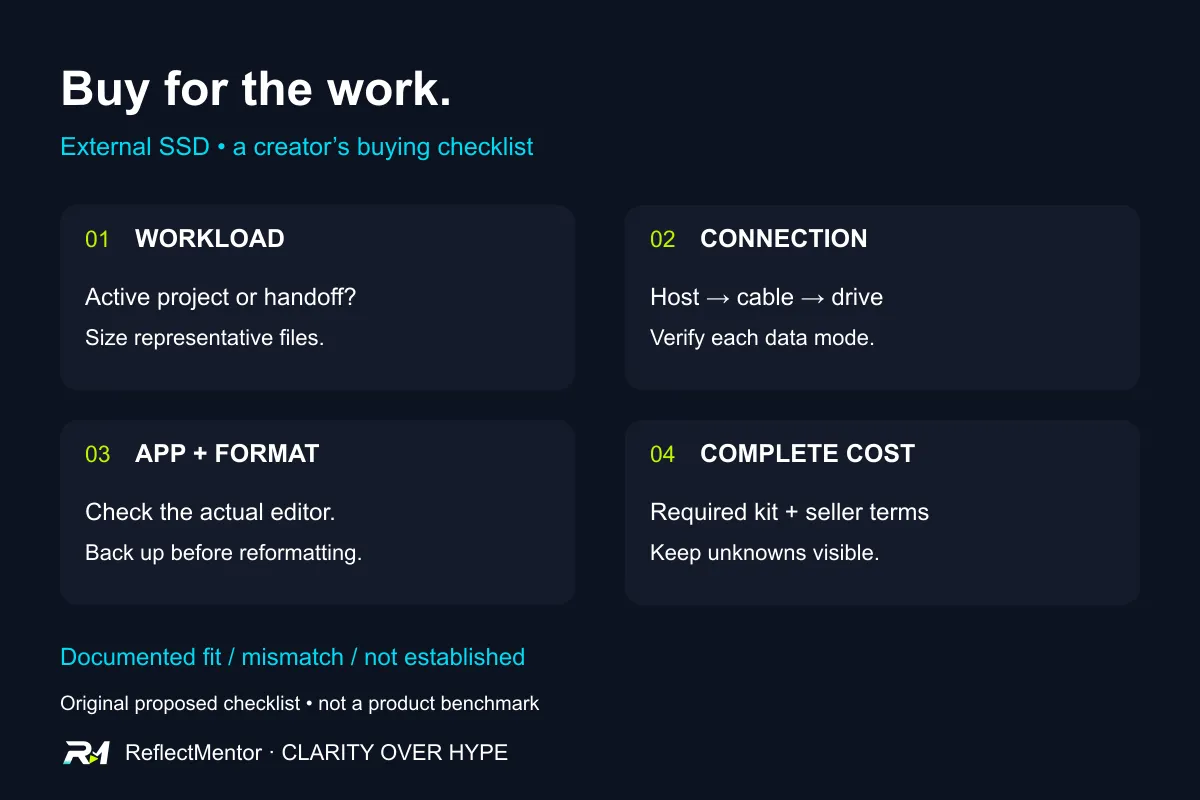
01 / Before You Buy
Write the job before choosing the drive
Imagine buying an external SSD for a video project, then discovering that your editing app needs a different disk format. The capacity fits your budget. The setup still needs work. This is a fictional buying problem, not a result from testing a drive.
Begin with a short workload brief.
Will the drive carry finished exports, hold active editing projects or pass files between computers? Write down the exact computer and app, the files you need to store and the way you expect to use them. Those answers give a product listing something useful to match.
This guide helps you build that brief and identify unresolved questions. It does not rank products or predict the performance of a drive we have not tested.
02 / Before You Buy
Size a real project, then list the other copies
Look at an existing project that resembles the next one. Record the space used by source footage, working files, generated media and final exports. If the project is still growing, label the figure as a snapshot rather than a finished storage requirement.
For a hypothetical creator, keeping one active project and handing off completed exports are separate jobs. Do not count the same free space as available for both at once. Add the projects you need to keep together and record what you would move elsewhere.
There is no universal capacity recommendation here. Your files provide a more useful starting point than a default shopping tier. Leave the growth allowance explicit, as your planning choice, rather than presenting it as a measured requirement. Name where another recoverable copy of important work will live. A larger working drive does not answer that question. The worksheet keeps working storage and the separate recovery plan in different rows.
03 / Before You Buy
Trace the computer, cable and connection
Record the exact computer model, the port you will use, the cable and any dock between the computer and drive. Find the supported data mode for each part. Keep an unknown entry when the documentation does not settle it.
USB-IF lists 5, 10 and 20Gbps transfer rates within USB 3.2 and says compatible products operate at their lowest common speed capability. [1] A USB 3.2 label alone therefore leaves a meaningful part of the buying question open.
Kingston provides a concrete example in its XS2000 support page: optimal performance requires USB 3.2 Gen 2x2, and it asks buyers to check the host and cable specifications. [2] That is a requirement for the cited drive, not proof that a particular laptop, dock or cable meets it.
Do not turn a protocol figure into a promised file-copy result. This article has no transfer measurements. If a seller advertises a headline speed, record the stated conditions and the evidence you still need for your own path.
04 / Before You Buy
Check the editing app before settling on a format
Write the names of the applications and operating systems that must use the drive. Then check their storage documentation. The question is whether the intended task is supported, not merely whether the computer can see the device.
Apple recommends APFS for external storage used with Final Cut Pro, Motion and Compressor on Mac. It warns that preformatted ExFAT or FAT32 devices may not perform as expected with those apps. [3] This is an app-specific example, not a rule that every creator should use APFS.
If your work moves between different computers or editors, identify that requirement before changing anything. Verify the supported format and workflow for the actual tools involved. Do not infer a suitable shared setup from the example above.
Formatting deletes data on the volume, as Apple also explains. [3] Preserve a verified backup before any required reformat, and use only an empty or disposable test device for experiments. We have not formatted a drive for this guide.
05 / Before You Buy
Compare the complete purchase, including unresolved costs
For each candidate, record the exact capacity and model, seller, dated checkout price and included cable. Add a replacement cable or adapter only when your documented setup needs it. Keep optional extras separate from required items.
Check current warranty and return terms for that seller and location. If the terms are unclear, leave them unresolved rather than assuming a general brand policy applies. No Indian price, stock level, warranty duration or return entitlement is verified in this guide.
Compare candidates only after the important fit questions are answered. A lower checkout price may leave a required part unpriced; a higher advertised speed may solve no documented problem in your workload. These are questions for the comparison, not conclusions about any named product.
06 / Before You Buy
Plan an acceptance check before checkout
If you buy a suitable candidate, start with disposable copies of representative files. Record the computer, port, cable, app version and disk format. Check whether the files open and the intended task works before relying on the setup for important work.
For a transfer check, record the file set, its size and the elapsed time. Keep a short copy and a longer working session distinct if both matter to you. A result would describe that setup and session; it would not establish lifetime reliability or performance across every project.
This is a proposed exercise. We have not run it or measured an improvement.
Use the worksheet to mark each requirement as documented fit, mismatch or not established. Resolve the gaps that would stop your work before checkout. The useful purchase is the one your project can actually use.
External SSD creator buying worksheet
| Requirement | Evidence to record | Decision / unresolved gap |
|---|---|---|
| Workload | Computer, app, active project or handoff task | Required task, not a benchmark claim |
| Capacity | Representative project size, concurrent projects and growth allowance | Snapshot plus explicit planning choice |
| Connection | Exact host, port, cable, dock and supported data mode | Documented fit / mismatch / not established |
| App and format | Actual app requirements and intended computers | Verify before any destructive reformat |
| Complete cost | Exact model, seller, dated price and required extras | Unknown until actual offer is checked |
| Terms | Location-specific seller returns and warranty | Checked / unresolved |
| Acceptance | Disposable files, setup, task and actual observations | Proposed, not performed by ReflectMentor |
| Recovery | Separate recoverable copy and restore plan | Working drive is a separate decision |
Sources & revision note
Primary sources checked 2026-11-20. Practical frameworks are editorial guidance; illustrative examples are not measured results.
- USB-IF: USB 3.2 — transfer rates and lowest common speed capability
- Kingston XS2000 support — host, cable and USB 3.2 Gen 2x2 requirements
- Apple Support: Format storage devices for Final Cut Pro, Motion and Compressor
Revision 1 · 2026-11-20: First publication: creator workload brief, documented compatibility examples, buying worksheet and proposed acceptance check.
Keep the useful part
Take the decision back to your work.
Buy for the complete storage workflow, with important gaps resolved before checkout.
This preference is private to this browser, not a public vote count.